

Google Jigsaw has announced that Perspective API will no longer be in service
after 2026. Existing integrations keep working until then, but new usage and
quota increases are no longer approved.
Hand it to a coding agent
This guide is available as Markdown, so a coding agent working in your repository can do the migration for you. Paste the prompt below into Claude Code, Cursor, Codex, or whatever agent you use, and it will read the guide and rewrite your Perspective call sites.Prompt
At a glance
Before you start
Create a project in the dashboard and copy its API key. Store it asMODAPI_SECRET_KEY, which is the environment variable the official SDKs read.
See Authentication for details.
Enable the policies that match your attributes
With Perspective you list the attributes you want in every request. With Moderation API the policies are configured once, on the project’s channel, and every request runs all of them. Open Policies in the dashboard and enable the policies that correspond to the attributes you request today. Use the attribute mapping table below to find each one.Swap the request
Replace the Perspective call with a call to/moderate. Pick your language below, then switch between the Perspective and Moderation API tabs to compare the two calls.
- TypeScript
- Python
- Ruby
- PHP
- cURL
Read the response
Perspective returns one score per requested attribute. Moderation API returns one entry per enabled policy in thepolicies array, plus an overall evaluation and a recommendation you can act on directly.
Perspective response
Moderation API response (trimmed)
If you rely on the scores
Most Perspective integrations readsummaryScore.value for each attribute and compare it against a threshold in their own code, often a different one per attribute. You can keep doing exactly that.
Each policy in the policies array carries a probability between 0 and 1, the same range Perspective uses. Build the same score object you have today from the mapped policies, and your downstream logic doesn’t need to change:
Perspective
Moderation API
probability is always returned, even below the threshold. Perspective’s
scoreThreshold option, which drops scores under a cutoff, has no
equivalent. Filter on your side if you need it.Use the dashboard to find the right thresholds
You can set threshold values in the dashboard and see what they would do before committing to them. Each policy has a Threshold tab under Policies in your project, showing a histogram of the confidence scores from your recent traffic. As you move the slider, the bars to the right are what would be flagged and the bars to the left what wouldn’t, with counts for how many recent items would flip sides.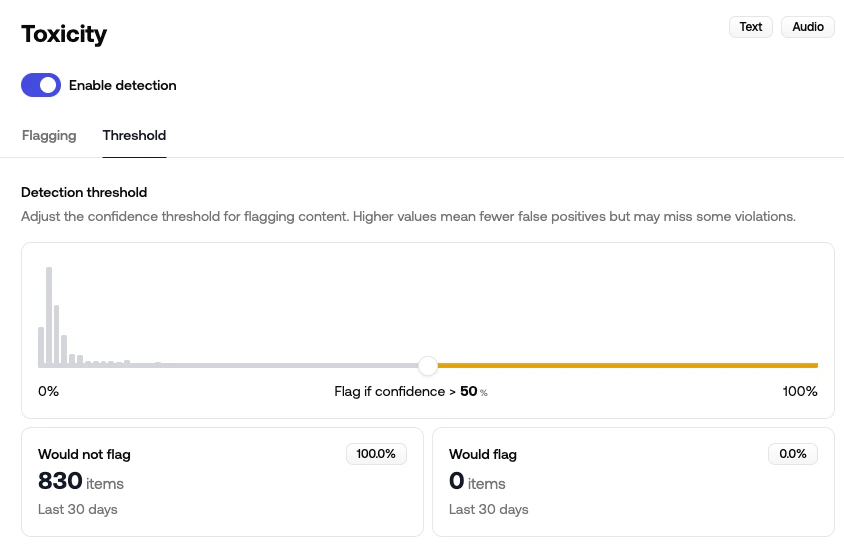
Or let the API make the decision
Once the thresholds live in the dashboard, you can drop the score comparison entirely. The API setsflagged on each policy, combines everything into a severity_score, and returns a recommendation.action of allow, review, or reject.
toxicity_severe from new accounts, review it from everyone else.”
Validate before you cut over
Run both APIs side by side on live traffic before you remove Perspective:- Enable dry-run in your project settings. The API still analyzes and stores everything, but
flaggedis alwaysfalse, so nothing is blocked while you compare. - Send your production content to
/moderatealongside your existing Perspective call and compare scores on the content you already have decisions for. - Adjust per-policy thresholds using the histogram on each policy’s Threshold tab, then turn dry-run off.
Dry-run mode: If you want to analyze production data but don't want to block content, enable "dry-run" in your project settings.
With dry-run enabled, the API still analyzes content but it always returns flagged: false - yet content still shows in the review queue. This way you can implement your moderation workflows and start testing your project configuration without actually blocking content.
If you’d rather test one policy at a time, shadow flagging lets a policy score traffic without affecting flagged.
Map request and response fields
Request
Response
Sending feedback
Perspective’scomments:suggestscore method lets you report a score you disagree with. Moderation API has no equivalent call. Instead, decisions your moderators make in the review queue are stored as cases in the casebook, which applies those rulings to similar content automatically. You can resolve items programmatically with the resolve a queue item endpoint.
Map attributes to policies
Each Perspective attribute maps to one Moderation API policy. Enable the policy in the dashboard, then read its entry in thepolicies array using the id below.
Bridging attributes
Perspective’s experimental bridging attributes score constructive qualities rather than harms. Moderation API doesn’t have equivalents yet.If you rely on any attribute marked WIP, let us
know. It helps us prioritize.
Self-harm
Self-harm, suicide, and eating-disorder content, which often deserves a
support resource rather than a rejection.
Personal information
Detect and mask emails, phone numbers, and addresses.
Phishing and code abuse
Scam messages, prompt injection, and malicious code.
Guidelines
Write your own rules in plain language and get them back as policies.
Other differences worth knowing
- Rate limits. Every response includes
X-RateLimit-Limit,X-RateLimit-Remaining, andX-RateLimit-Resetheaders, and a429includesRetry-After. See Rate limits. - Partial failures. If one policy fails, the rest still return. Check
meta.statusforpartial_successand read theerrorsarray. See Handle errors. - Mixed content. Send a profile or listing with several fields as a single
objectand getflagged_fieldsback per policy. See Object. - Review queue. Every stored submission is available for human review without any extra integration work. See Review.