

Detection is powered by our open‑source
@moderation-api/unicode-spoofing
package, based on the official Unicode data and refreshed regularly as Unicode
publishes updates.How it works
The policy analyzes a message word by word. Instead of flagging any non‑English character — which would break legitimate multilingual content — it looks for evidence that a character was chosen to disguise itself as something else, by comparing each character against Unicode’s catalog of known lookalikes. Genuine foreign words have no lookalike to hide behind, so they pass through untouched.Signals
The policy reports five independent signals. Each shows up as a label on the result, and each can be turned on or off individually.Enable and configure
Unicode spoofing is configured entirely from the dashboard.1
Open the policy
In your channel, go to Policies → Spam and find the Unicode spoofing
card.
2
Enable detection
Toggle Enable detection on.
3
Choose how to act
Pick Flag to act on detections, or Shadow flag to observe without
flagging while you tune. Shadow‑flagged content is visible in queues configured
to show it.
4
Pick which signals enforce (optional)
Under Signals, every signal is on by default. Turn one off to keep detecting
and reporting it while stopping it from flagging on its own — useful if, say, you
want to see Zalgo without acting on it.
In the review queue
Spoofed text is designed to look ordinary, so a flagged item can read as perfectly clean to the moderator reviewing it. To make the detection reviewable, the item detail view highlights the exact tokens that tripped the policy.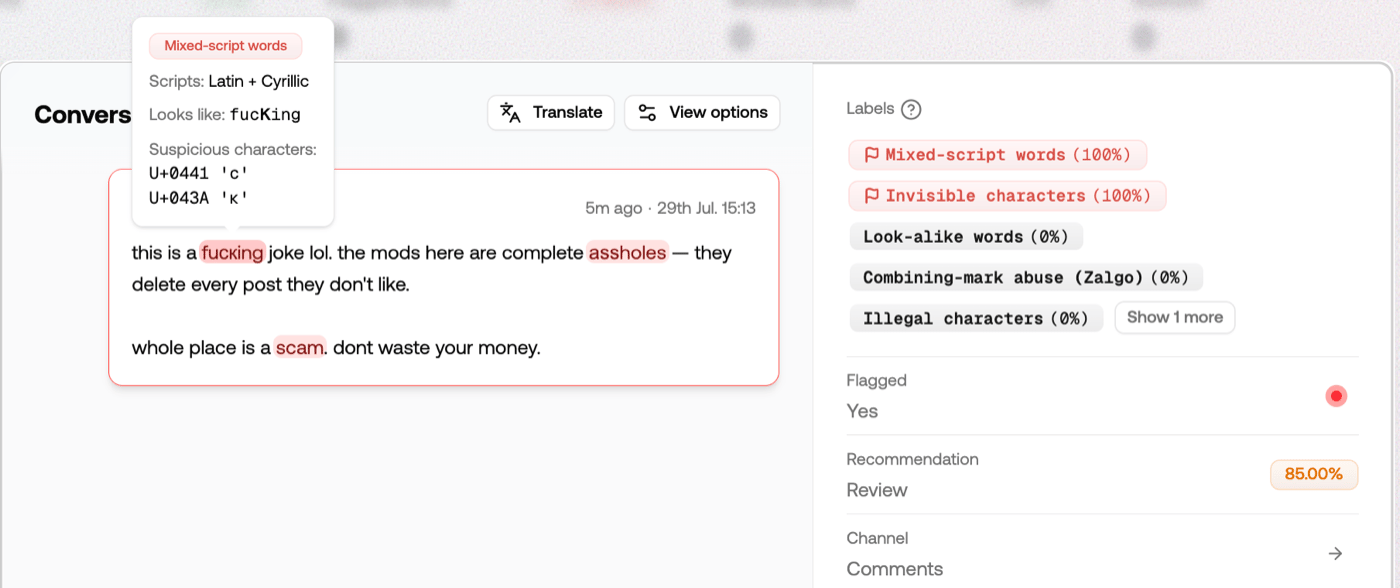
- Which signal fired — mixed script, look-alike, invisible, or Zalgo.
- Which scripts are mixed into the word.
- What it looks like — the word after look-alike characters are folded away, so you can see the banned word it was disguising.
- The exact code points involved, as
U+XXXX.
The original characters are what we store, so the evidence is reconstructed
from the item itself. Items moderated before this shipped were stored already
cleaned up, and show an “original unavailable” note instead of highlights.
Reading the result
When enabled, the policy appears in the response’spolicies array. See
Understanding API responses for the
full response shape.
boolean
Whether an enabled signal fired.
number
1 when an enabled signal fired, 0 otherwise. In shadow flag mode this is
still 1 while flagged stays false.array
One entry per signal —
{ id, probability, flagged }. A label with
probability: 1 but flagged: false means that signal was detected but is
turned off in your settings.string[]
For object content, the field keys where a signal fired. Omitted for plain
text.
object
policies array — the top‑level
evaluation.unicode_spoofed flag and the cleaned‑up content.modified text.
Both come from normalization and are set whether or not this policy is enabled.
See Normalization below.
Example
Response
Acting on detections
The policy feeds the rules engine and review queues like any other, so you decide what happens to spoofed content:- Block it. Add a rule that rejects content when Unicode spoofing is flagged. The policy also raises the severity score, so channels using severity‑based recommendations lean toward rejection automatically.
- Route signals differently. Each signal is available separately in rules — for example, reject clear lookalike attacks while sending Zalgo to human review.
- Send the clean version instead. If your goal is deliverability rather than
blocking, forward the cleaned‑up text from
content.modifiedso the message goes out in a form that won’t be blocked.
Normalization
Separately from the policy, your channel has a Unicode spoof detection setting under Content → Text, on by default. It rewrites disguised text before any other policy runs, so the rest of your setup sees the real message instead of the disguise. With it on, a message likeBuy сhеар vіаgrа reaches your wordlists and
classifiers as Buy cheap viagra — so a banned word wrapped in lookalikes still
gets caught by the wordlist that was already looking for it.
Normalization rewrites only the words that carry a signal: lookalikes become
their real letters, invisible characters are removed, and Zalgo is stripped.
Text that isn’t disguised is passed through untouched, byte for byte, so
legitimate multilingual content survives normalization intact.
Normalization applies to text. Image, video, audio, and URL content is
unaffected. For object content, each field is normalized on its own.
The setting and the policy together
They’re independent, and each is useful without the other:
The common setup is both on: keep the setting on so spoofing can’t hide banned
words from your other policies, and enable the policy to act on the spoofing
itself.
In the response
Normalization surfaces in two fields, whether or not the policy is enabled:boolean
true when spoofing was detected anywhere in the message. Omitted entirely
when both the channel setting and the policy are off, since nothing analyzed
the text.string | object
The normalized message, present whenever normalization changed the text. If
masking is also enabled, this field carries the masked and normalized
result.
content.modified when your goal is deliverability rather than
blocking — it’s the same message in a form that won’t trip carrier filters.
FAQ
Will this flag legitimate non-English messages?
Will this flag legitimate non-English messages?
No. A message written entirely in another language, or an English message that
contains a genuine foreign word or name, is not flagged — real foreign letters
have no lookalike to impersonate. Detection keys on disguise (a character
pretending to be a different one), not on the mere presence of another alphabet.
Does it add usage or latency?
Does it add usage or latency?
No extra usage — Unicode spoofing detection is included, with no additional
model call, and adds negligible latency to a moderation request.
Which alphabets and characters are covered?
Which alphabets and characters are covered?
All of them. Detection is based on the full Unicode lookalike data, so Cyrillic,
Greek, Cherokee, Armenian, full‑width and stylized letterforms, and more are all
covered.
Is the detection kept up to date?
Is the detection kept up to date?
Yes. It’s based on the official Unicode data and refreshed regularly as Unicode
publishes updates, so newly introduced lookalike characters are covered
automatically — nothing changes on your side.