

Prerequisites
You'll need an API key to use the Moderation API. To get one, you'll need to create a project.1. Install the SDK
Requires Node.js 18 or higher. The SDK also runs on Bun, Deno, Cloudflare Workers and other runtimes with the Fetch API. Use it on your server only, so your API key stays secret.
2. Submit content
Grab the API key from your project and begin submitting text, images, or other media to your project for moderation.Dry-run mode: If you want to analyze production data but don't want to block content, enable "dry-run" in your project settings.
With dry-run enabled, the API still analyzes content but it always returns flagged: false - yet content still shows in the review queue. This way you can implement your moderation workflows and start testing your project configuration without actually blocking content.
3. Review flagged content (optional)
If the AI flags the content, it will appear in the Review inbox. Head to the review queue to validate that the content is submitted correctly.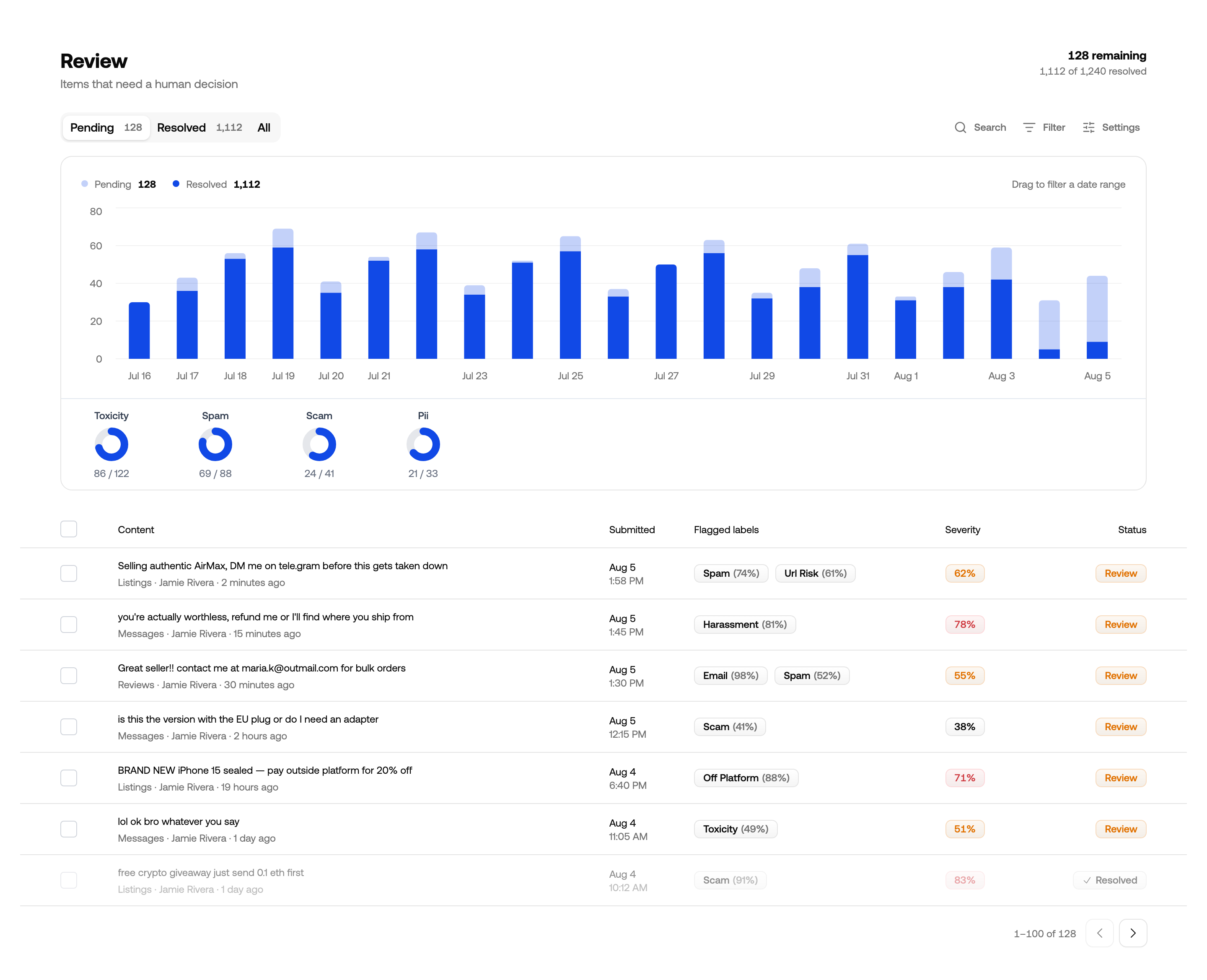
Review queue for reviewing and improving automated moderation
All Done!
Congratulations! You've run your first moderation checks. Here are a few next steps:- Continue tweaking your project settings and models to find the best moderation outcomes.
- Add custom Guidelines to a channel for rules specific to your platform.
- Explore advanced features like context-aware moderation.
- If you have questions, reach out to our support team.