> ## Documentation Index
> Fetch the complete documentation index at: https://docs.moderationapi.com/llms.txt
> Use this file to discover all available pages before exploring further.
# User moderation
> Learn how to manage users to improve moderation
 ## Introduction
Enabling user management in Moderation API solves some of the most common moderation challenges for community platforms.
This is done by introducing the concept of authors (users) in the moderation process. Each author has a [trust level](/users/trust-levels) that is automatically adjusted based on their behavior and moderation history.
User management lets you:
* Tailor and improve moderation accuracy based on trust levels
* Skip moderation for trusted users
* Block or suspend users
* Fraud detection using behavioral analysis
Access the user dashboard to view and manage your users.
Access endpoints to read and update author details.
## Get started
Just add an `authorId` when submitting content to a [moderation
endpoint](/api-reference/moderate/analyze-text).
We recommend using the user ID from your system
but any unique identifier like email or username will work.
You should now see your users appear in the [user dashboard](https://dash.moderationapi.com/users).
There might be a delay in user creation and trust level calculation. This is
because we process users in batches to optimize performance.
## Typical workflow
Here's a common workflow for implementing user management in your moderation system:
Start by including an `authorId` when submitting content for moderation:
```javascript theme={"theme":"nord"}
const response = await fetch("https://api.moderationapi.com/v1/moderate", {
method: "POST",
headers: {
Authorization: "Bearer YOUR_API_KEY",
"Content-Type": "application/json",
},
body: JSON.stringify({
content: {
type: "text",
text: "User's message content",
},
authorId: "user_123",
}),
});
```
Authors are automatically created on first submission.
[Add additional author information](/users/updating-authors) to improve trust scoring and enable fraud detection:
```javascript theme={"theme":"nord"}
await fetch("https://api.moderationapi.com/v1/authors/user_123", {
method: "PUT",
headers: { Authorization: "Bearer YOUR_API_KEY" },
body: JSON.stringify({
name: "John Doe",
email: "john@example.com",
metadata: {
email_verified: true,
is_paying_customer: true,
},
}),
});
```
Check the user dashboard or use the API to monitor [trust levels](/users/trust-levels):
* **New users (Level 0)**: Extra scrutiny for first-time posters
* **Established users (Level 2+)**: Reduced moderation overhead
* **Problematic users (Level -1)**: Automatic flagging for review
## Introduction
Enabling user management in Moderation API solves some of the most common moderation challenges for community platforms.
This is done by introducing the concept of authors (users) in the moderation process. Each author has a [trust level](/users/trust-levels) that is automatically adjusted based on their behavior and moderation history.
User management lets you:
* Tailor and improve moderation accuracy based on trust levels
* Skip moderation for trusted users
* Block or suspend users
* Fraud detection using behavioral analysis
Access the user dashboard to view and manage your users.
Access endpoints to read and update author details.
## Get started
Just add an `authorId` when submitting content to a [moderation
endpoint](/api-reference/moderate/analyze-text).
We recommend using the user ID from your system
but any unique identifier like email or username will work.
You should now see your users appear in the [user dashboard](https://dash.moderationapi.com/users).
There might be a delay in user creation and trust level calculation. This is
because we process users in batches to optimize performance.
## Typical workflow
Here's a common workflow for implementing user management in your moderation system:
Start by including an `authorId` when submitting content for moderation:
```javascript theme={"theme":"nord"}
const response = await fetch("https://api.moderationapi.com/v1/moderate", {
method: "POST",
headers: {
Authorization: "Bearer YOUR_API_KEY",
"Content-Type": "application/json",
},
body: JSON.stringify({
content: {
type: "text",
text: "User's message content",
},
authorId: "user_123",
}),
});
```
Authors are automatically created on first submission.
[Add additional author information](/users/updating-authors) to improve trust scoring and enable fraud detection:
```javascript theme={"theme":"nord"}
await fetch("https://api.moderationapi.com/v1/authors/user_123", {
method: "PUT",
headers: { Authorization: "Bearer YOUR_API_KEY" },
body: JSON.stringify({
name: "John Doe",
email: "john@example.com",
metadata: {
email_verified: true,
is_paying_customer: true,
},
}),
});
```
Check the user dashboard or use the API to monitor [trust levels](/users/trust-levels):
* **New users (Level 0)**: Extra scrutiny for first-time posters
* **Established users (Level 2+)**: Reduced moderation overhead
* **Problematic users (Level -1)**: Automatic flagging for review
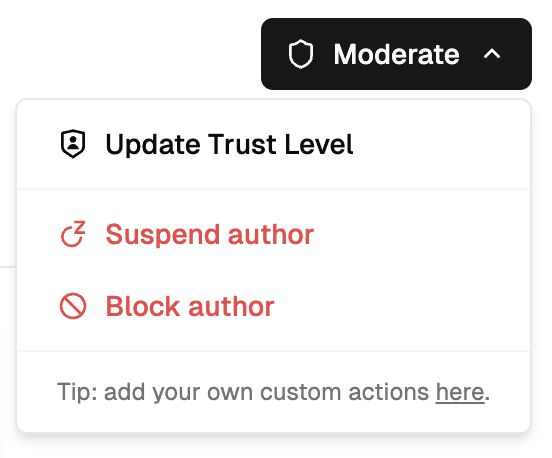 When you identify problematic users, take action from the [user dashboard](https://dash.moderationapi.com/project/latest/authors):
The user's status will be updated and your application can respond accordingly.
Before allowing users to post, check their status and respond appropriately:
```javascript theme={"theme":"nord"}
const author = await fetch(`/api/v1/authors/${userId}`);
const userData = await author.json();
if (userData.status !== "enabled") {
if (userData.status === "suspended") {
const suspendedUntil = new Date(userData.block.until);
throw new Error(
`Account suspended until ${suspendedUntil.toLocaleDateString()}`,
);
} else if (userData.status === "blocked") {
throw new Error("Account has been permanently blocked");
}
}
// User is enabled - allow posting
await publishContent(content);
```
Set up [webhooks](/actions/webhooks) to automatically notify users of moderation actions:
```javascript theme={"theme":"nord"}
// Webhook handler for user actions
app.post("/webhook/user-actions", (req, res) => {
const event = req.body;
if (event.type === "author.suspended") {
const { author } = event.data.object;
const reason = author.block?.reason;
const until = author.block?.until; // Unix ms timestamp
sendEmail(author.email, {
subject: "Account Temporarily Suspended",
body: `Your account has been suspended. Reason: ${reason}`,
unsuspendDate: until ? new Date(until) : undefined,
});
}
res.status(200).send("OK");
});
```
When you identify problematic users, take action from the [user dashboard](https://dash.moderationapi.com/project/latest/authors):
The user's status will be updated and your application can respond accordingly.
Before allowing users to post, check their status and respond appropriately:
```javascript theme={"theme":"nord"}
const author = await fetch(`/api/v1/authors/${userId}`);
const userData = await author.json();
if (userData.status !== "enabled") {
if (userData.status === "suspended") {
const suspendedUntil = new Date(userData.block.until);
throw new Error(
`Account suspended until ${suspendedUntil.toLocaleDateString()}`,
);
} else if (userData.status === "blocked") {
throw new Error("Account has been permanently blocked");
}
}
// User is enabled - allow posting
await publishContent(content);
```
Set up [webhooks](/actions/webhooks) to automatically notify users of moderation actions:
```javascript theme={"theme":"nord"}
// Webhook handler for user actions
app.post("/webhook/user-actions", (req, res) => {
const event = req.body;
if (event.type === "author.suspended") {
const { author } = event.data.object;
const reason = author.block?.reason;
const until = author.block?.until; // Unix ms timestamp
sendEmail(author.email, {
subject: "Account Temporarily Suspended",
body: `Your account has been suspended. Reason: ${reason}`,
unsuspendDate: until ? new Date(until) : undefined,
});
}
res.status(200).send("OK");
});
```