> ## Documentation Index
> Fetch the complete documentation index at: https://docs.moderationapi.com/llms.txt
> Use this file to discover all available pages before exploring further.
# Reviewing content
> Working through a view, item by item
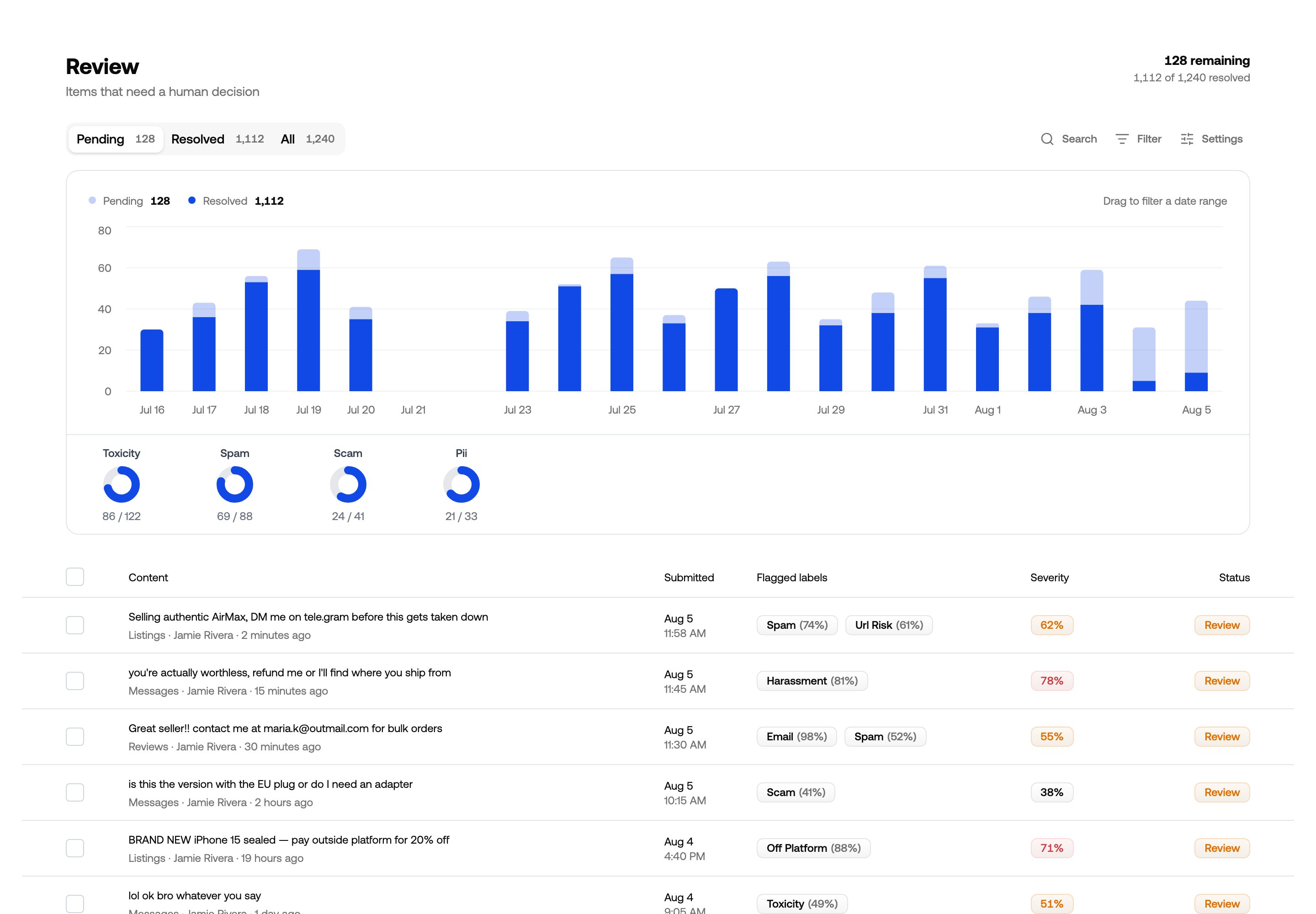 Open the inbox or any [content view](/review/content-views) and you get the same
page: a chart of what's come in, tabs, and the list itself.
## Pending, resolved, all
The tabs switch what the list shows. **Pending** is the work; **Resolved** is what's
already been decided, where you can unresolve an item to look at it again; **All** is
both. Everything else on the page — chart, counts, filters — follows the tab.
## The chart
Each bar is what arrived in that period, split into resolved and still-pending. Click
either series in the legend to hide it.
Drag across the chart to narrow the list to that range — useful when you spot a spike
and want to know what caused it. The range becomes a date chip in the filter bar, so you
can adjust or remove it like any other filter.
Underneath, each label shows how much of it is still open. Clicking a label filters the
list to it — a fast way to see what's actually driving the backlog.
## The list
* Click a row to open it.
* Click the checkmark to resolve it without opening it.
* Tick several rows to act on them together.
Selecting items brings up an action bar with your [actions](/actions/content-actions),
**Resolve**, and **Edit labels** for correcting labels across the whole selection. On
the Resolved tab the button flips to **Unresolve**, so a batch resolved too eagerly
comes back in one step.
Open the inbox or any [content view](/review/content-views) and you get the same
page: a chart of what's come in, tabs, and the list itself.
## Pending, resolved, all
The tabs switch what the list shows. **Pending** is the work; **Resolved** is what's
already been decided, where you can unresolve an item to look at it again; **All** is
both. Everything else on the page — chart, counts, filters — follows the tab.
## The chart
Each bar is what arrived in that period, split into resolved and still-pending. Click
either series in the legend to hide it.
Drag across the chart to narrow the list to that range — useful when you spot a spike
and want to know what caused it. The range becomes a date chip in the filter bar, so you
can adjust or remove it like any other filter.
Underneath, each label shows how much of it is still open. Clicking a label filters the
list to it — a fast way to see what's actually driving the backlog.
## The list
* Click a row to open it.
* Click the checkmark to resolve it without opening it.
* Tick several rows to act on them together.
Selecting items brings up an action bar with your [actions](/actions/content-actions),
**Resolve**, and **Edit labels** for correcting labels across the whole selection. On
the Resolved tab the button flips to **Unresolve**, so a batch resolved too eagerly
comes back in one step.
 Which columns appear is [a view setting](/review/view-settings#columns), including
columns built from your own `metadata`.
## An item up close
Which columns appear is [a view setting](/review/view-settings#columns), including
columns built from your own `metadata`.
## An item up close
 The detail panel shows the content itself, the labels that applied and why the item
was flagged, the metadata you submitted, the item's history, and — where relevant —
the rule or threshold that produced the outcome.
Content submitted as HTML renders in full, images and video included. Metadata that
looks like a URL becomes a link back into your own system.
### Conversations
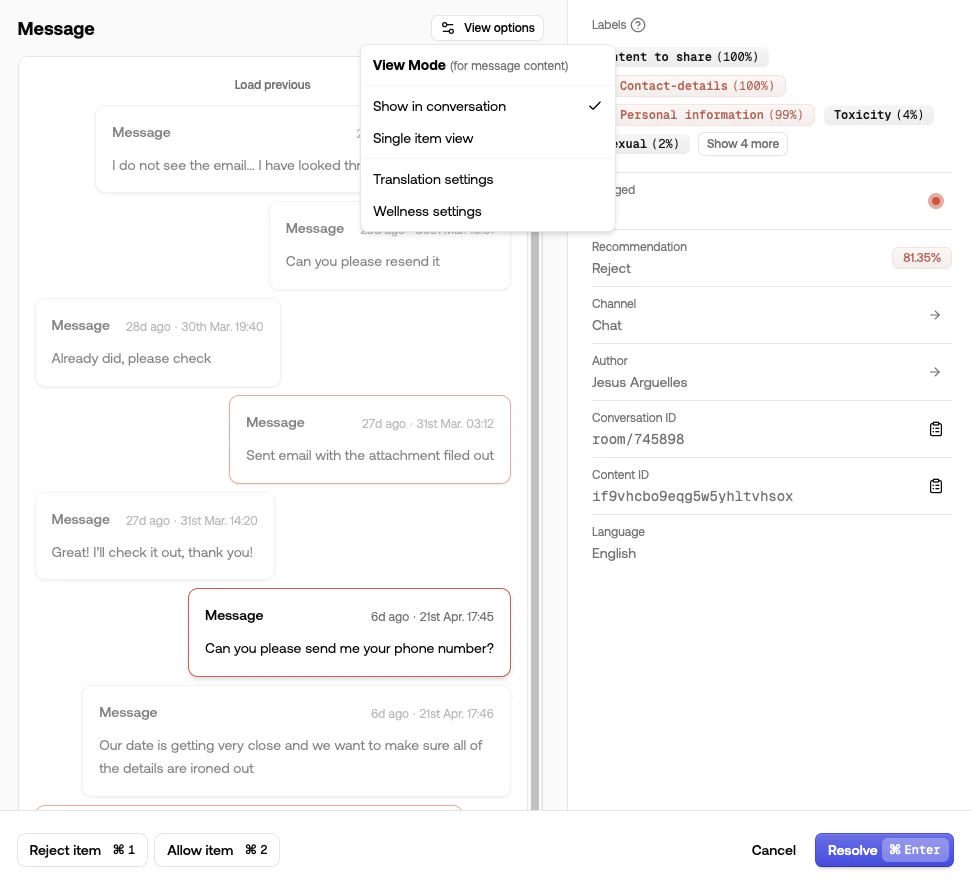
If you submit a `conversationId`, the surrounding messages from that thread appear
inline, so you can read a remark in the exchange it belongs to instead of on its own.
The detail panel shows the content itself, the labels that applied and why the item
was flagged, the metadata you submitted, the item's history, and — where relevant —
the rule or threshold that produced the outcome.
Content submitted as HTML renders in full, images and video included. Metadata that
looks like a URL becomes a link back into your own system.
### Conversations
If you submit a `conversationId`, the surrounding messages from that thread appear
inline, so you can read a remark in the exchange it belongs to instead of on its own.
 ### Correcting a decision
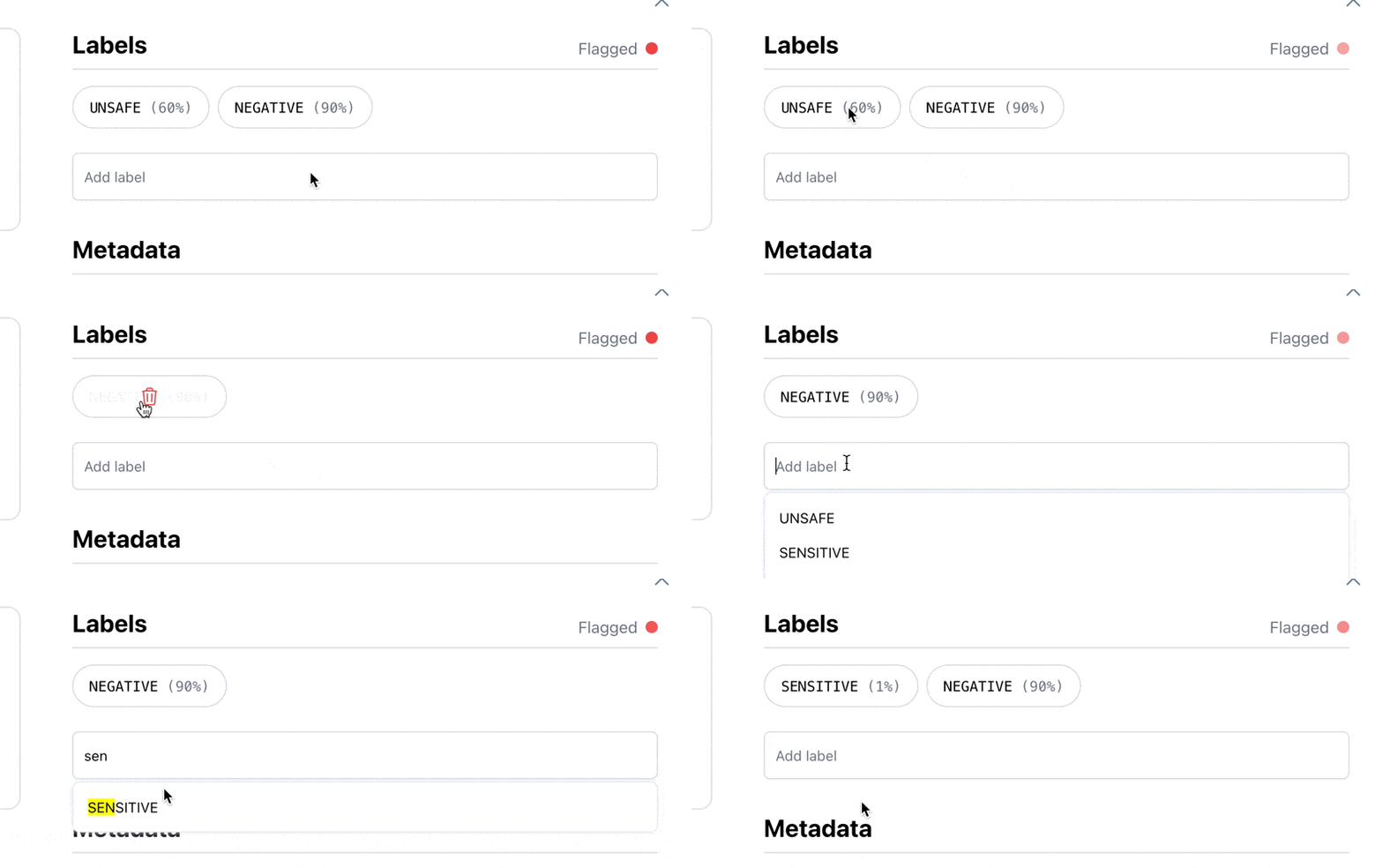
If a label is wrong, remove it and add the right one. Clearing every label means the
content warranted no flag at all.
Corrections are kept and used the next time you run
[adaptive optimization](/custom-models/adaptive-model-optimization), so the policies
drift toward your judgement rather than away from it.
### Correcting a decision
If a label is wrong, remove it and add the right one. Clearing every label means the
content warranted no flag at all.
Corrections are kept and used the next time you run
[adaptive optimization](/custom-models/adaptive-model-optimization), so the policies
drift toward your judgement rather than away from it.
 ### Translating
Click **Translate** for content in a language you don't read. The setting sticks as
you move between items. See [Translation](/review/translation).
### Sensitive media
Images and video can be blurred, greyscaled or started muted. Each moderator sets
their own preference, and you can set a default for the project — see
[Reviewer wellness](/review/wellness).
### Acting and moving on
Run an action or resolve from the detail panel, and it moves to the next pending item.
On an item that's already resolved, the button reads **Undo resolve** instead.
Cmd + Enter resolves, Cmd + 1–9
runs an action, and the arrow keys move between items.
## Resolving
Resolving means the item has been dealt with; it moves to the **Resolved** tab. You can
resolve from the list, from the selection bar, from the detail panel, or automatically
as part of an
[action](/actions/content-actions#resolving-an-item-when-an-action-runs).
Whether resolving here also clears the item elsewhere depends on the view — see
[items leave this view when](/review/view-settings#items-leave-this-view-when).
## Looking something up
The search box matches content text; each term becomes its own chip, and further terms
narrow the results. **Filter** also takes an author, a content ID or a conversation ID
when you need to pull up one specific thing — a content ID gives you every moderation
request for that item, which is what you want when a user appeals a decision. These
lookups are temporary and never saved into the view.
To investigate an author properly — their history, trust level and past actions —
open their [author profile](/users/overview) rather than filtering the list.
### Translating
Click **Translate** for content in a language you don't read. The setting sticks as
you move between items. See [Translation](/review/translation).
### Sensitive media
Images and video can be blurred, greyscaled or started muted. Each moderator sets
their own preference, and you can set a default for the project — see
[Reviewer wellness](/review/wellness).
### Acting and moving on
Run an action or resolve from the detail panel, and it moves to the next pending item.
On an item that's already resolved, the button reads **Undo resolve** instead.
Cmd + Enter resolves, Cmd + 1–9
runs an action, and the arrow keys move between items.
## Resolving
Resolving means the item has been dealt with; it moves to the **Resolved** tab. You can
resolve from the list, from the selection bar, from the detail panel, or automatically
as part of an
[action](/actions/content-actions#resolving-an-item-when-an-action-runs).
Whether resolving here also clears the item elsewhere depends on the view — see
[items leave this view when](/review/view-settings#items-leave-this-view-when).
## Looking something up
The search box matches content text; each term becomes its own chip, and further terms
narrow the results. **Filter** also takes an author, a content ID or a conversation ID
when you need to pull up one specific thing — a content ID gives you every moderation
request for that item, which is what you want when a user appeals a decision. These
lookups are temporary and never saved into the view.
To investigate an author properly — their history, trust level and past actions —
open their [author profile](/users/overview) rather than filtering the list.