> ## Documentation Index
> Fetch the complete documentation index at: https://docs.moderationapi.com/llms.txt
> Use this file to discover all available pages before exploring further.
# Concepts
> How organizations, projects, channels, and policies fit together in Moderation API.
Moderation API is organized as a four-level hierarchy. Most work happens inside a project; the other levels matter when you start scaling — adding teammates, separating environments, or running multiple products on the same plan.
```mermaid theme={"theme":"nord"}
flowchart TB
subgraph O["Organization"]
direction TB
subgraph P["Project"]
direction TB
A["Authors"]
Q["Queues"]
subgraph C["Channel"]
direction TB
PO["Policies"]
end
end
end
style O fill:#eff6ff,stroke:#2563eb,stroke-width:1.5px,color:#1e3a8a
style P fill:#dbeafe,stroke:#2563eb,stroke-width:1.5px,color:#1e3a8a
style A fill:#bfdbfe,stroke:#2563eb,stroke-width:1.5px,color:#1e3a8a
style Q fill:#bfdbfe,stroke:#2563eb,stroke-width:1.5px,color:#1e3a8a
style C fill:#bfdbfe,stroke:#2563eb,stroke-width:1.5px,color:#1e3a8a
style PO fill:#2563eb,stroke:#1e40af,stroke-width:1.5px,color:#ffffff
```
## Organization
The organization is the top-level container. It owns:
* Billing and plan (quota, plan tier, invoices).
* Team members who can access the organization's projects.
* Custom models, trained once and reusable across any channel in any project.
* Wordlists, managed in one place and enabled on the channels that need them.
A user can belong to multiple organizations, and an organization can contain multiple projects.
## Project
Projects scope your content and authors. Everything you submit to the API (content, [authors](/users/overview), [content queues](/review-queues/overview), [actions](/actions/overview), and channels) belongs to a single project.
Most teams use projects to separate environments like production and staging, or to keep distinct products apart. Each project has its own API key.
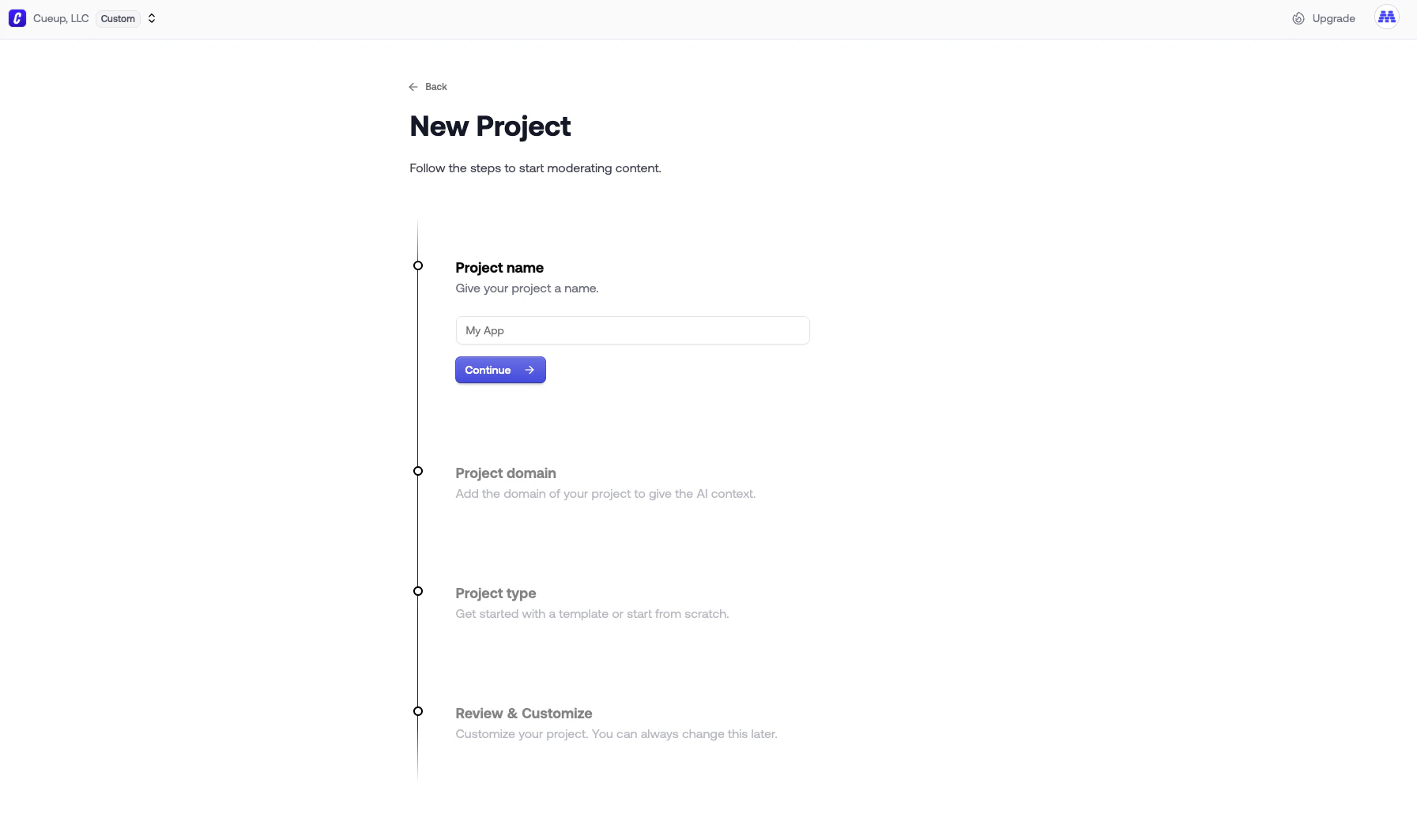 When you create a project you fill in:
* A **name** for the dashboard.
* A **domain**: the website or app this project moderates. The AI uses it as context, which sharpens the accuracy of LLM-based policies like [Guidelines](/policies/guidelines).
* A **type**: pick a template to preconfigure channels and queues, or start from scratch.
Templates available today:
| Template | What it sets up |
| ----------- | -------------------------------------------------------------------------------------------------------------------------------------------- |
| Marketplace | `listings`, `messages`, and `reviews` channels, plus queues for unreviewed listings, flagged reviews, auto-rejected listings, and bad actors |
| Game | `chat` and `usernames` channels |
| Blog | a channel for blog post comments |
| Community | channels for forum-style posts and comments |
| Blank | nothing pre-configured |
Templates create the channels and queues. You decide which policies to enable on each channel.
## Channel
Channels live inside a project and represent a specific surface or content type. Common examples are `chat`, `reviews`, `listings`, `usernames`, and `profile-bio`. Each channel is configured independently, so you can apply strict rules to user-to-user messages while keeping product listings looser.
When you create a project you fill in:
* A **name** for the dashboard.
* A **domain**: the website or app this project moderates. The AI uses it as context, which sharpens the accuracy of LLM-based policies like [Guidelines](/policies/guidelines).
* A **type**: pick a template to preconfigure channels and queues, or start from scratch.
Templates available today:
| Template | What it sets up |
| ----------- | -------------------------------------------------------------------------------------------------------------------------------------------- |
| Marketplace | `listings`, `messages`, and `reviews` channels, plus queues for unreviewed listings, flagged reviews, auto-rejected listings, and bad actors |
| Game | `chat` and `usernames` channels |
| Blog | a channel for blog post comments |
| Community | channels for forum-style posts and comments |
| Blank | nothing pre-configured |
Templates create the channels and queues. You decide which policies to enable on each channel.
## Channel
Channels live inside a project and represent a specific surface or content type. Common examples are `chat`, `reviews`, `listings`, `usernames`, and `profile-bio`. Each channel is configured independently, so you can apply strict rules to user-to-user messages while keeping product listings looser.
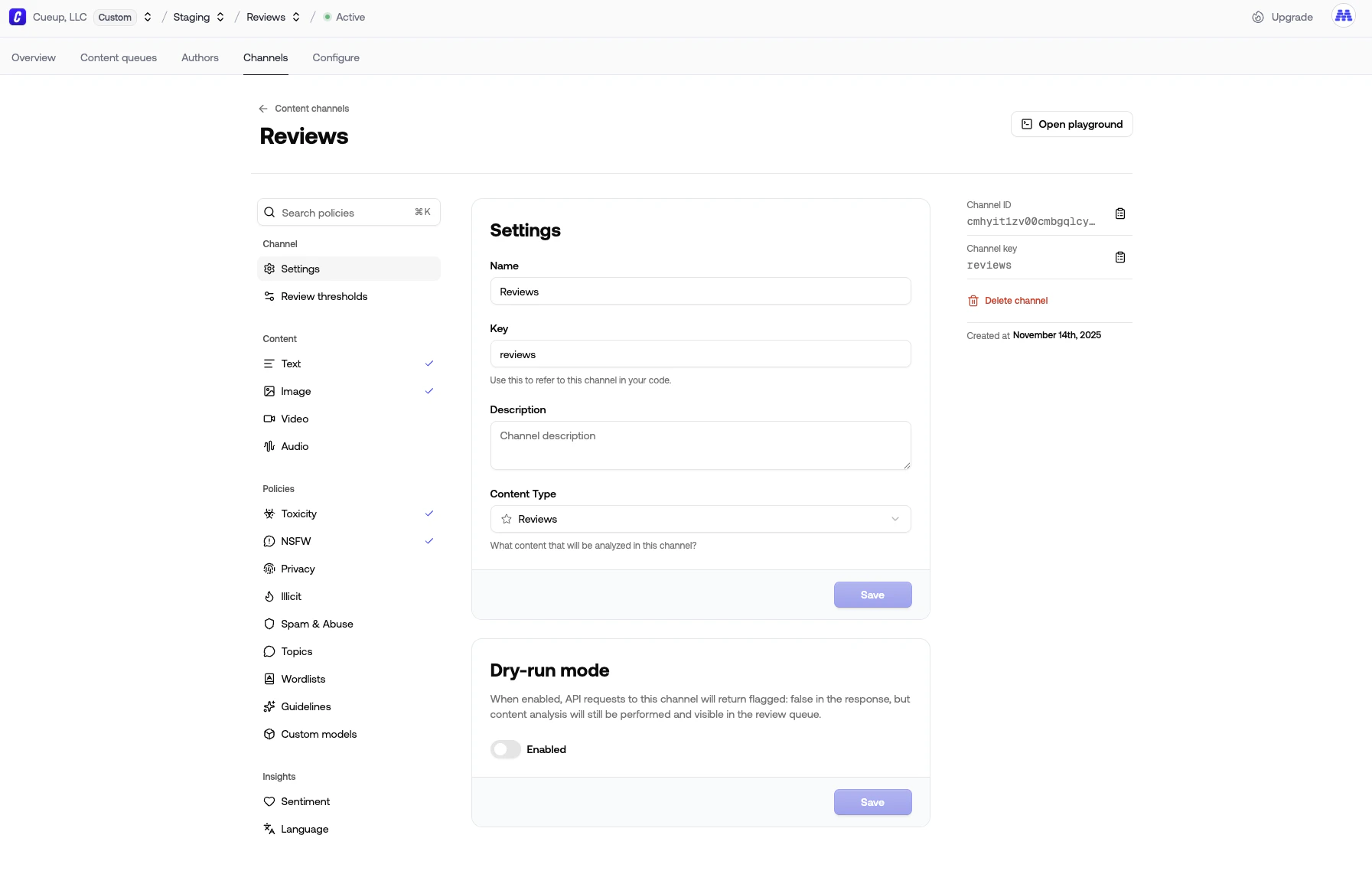 A channel owns:
* **Settings.** Name, key (used to route requests, see below), description, and the [content types](/content-moderation/submit-content#content-types) it accepts (text, image, video, audio).
* **Review thresholds.** The cutoffs at which content gets flagged.
* **Policies.** The rules that score content. Toggle each one on or off per channel. See [Policies](/policies/overview) for the full list.
* **Insights.** Opt-in signals like sentiment and language. They come back alongside policy results but don't affect flagging.
* **Dry-run mode.** When on, API responses always return `flagged: false` so production traffic isn't blocked, but content is still analyzed and lands in your queues. Use it to preview a channel before going live.
### Routing requests to a channel
You authenticate with a project's API key. To pick which channel handles each request, the API checks, in order:
1. The `channel` field in the request body (see [Submitting content](/content-moderation/submit-content#channel)).
2. A channel whose content type matches the request's `metaType`. For example, `metaType: "review"` routes to a channel configured for reviews.
3. Otherwise, the newest channel in the project.
You can also set a channel as the project's default route to override step 3.
## Policies
A policy is a single rule that runs against submitted content. Each enabled policy returns one entry in the API response's `policies` array. Because policies are enabled per channel, the same project can run [Toxicity](/policies/toxicity) on chat messages while only running [Privacy](/policies/privacy) on profile bios.
Policies fall into two types:
| Type | What it does |
| ---------------- | ------------------------------------------------------------------------------------ |
| `classifier` | Scores content against labels and returns a probability (e.g. Toxicity, NSFW). |
| `entity_matcher` | Extracts specific entities like URLs, emails, or phone numbers (e.g. Privacy, Spam). |
See the [Policies overview](/policies/overview) for the full catalog.
A few pieces sit above the channel and get attached to it:
* **Custom models** are trained at the organization level and can be enabled on any channel.
* **Wordlists** are also organization-level, then enabled per channel.
* **Guidelines** are written per channel, since the rules usually depend on the surface.
## Authors
Authors (your end users) are scoped to the project, not the channel. A single author can post into multiple channels. For example, the same user might send chat messages, write reviews, and update their profile bio. The author's [trust level](/users/trust-levels) and moderation history aggregate across every channel in the project.
## Review queues
[Review queues](/review-queues/overview) collect content for human review. Queues are project-scoped and use filters to decide what shows up. Typical filters are channel, label, and the action that was taken. A project can have many queues, each tuned to a different reviewer workflow.
## Quota
Quota is shared across the organization. Each request to the `/moderate` endpoint consumes quota. Most requests cost one unit, though some content types and policies cost more. See [Quota & usage](/account/quota-usage) for the per-policy cost table.
A channel owns:
* **Settings.** Name, key (used to route requests, see below), description, and the [content types](/content-moderation/submit-content#content-types) it accepts (text, image, video, audio).
* **Review thresholds.** The cutoffs at which content gets flagged.
* **Policies.** The rules that score content. Toggle each one on or off per channel. See [Policies](/policies/overview) for the full list.
* **Insights.** Opt-in signals like sentiment and language. They come back alongside policy results but don't affect flagging.
* **Dry-run mode.** When on, API responses always return `flagged: false` so production traffic isn't blocked, but content is still analyzed and lands in your queues. Use it to preview a channel before going live.
### Routing requests to a channel
You authenticate with a project's API key. To pick which channel handles each request, the API checks, in order:
1. The `channel` field in the request body (see [Submitting content](/content-moderation/submit-content#channel)).
2. A channel whose content type matches the request's `metaType`. For example, `metaType: "review"` routes to a channel configured for reviews.
3. Otherwise, the newest channel in the project.
You can also set a channel as the project's default route to override step 3.
## Policies
A policy is a single rule that runs against submitted content. Each enabled policy returns one entry in the API response's `policies` array. Because policies are enabled per channel, the same project can run [Toxicity](/policies/toxicity) on chat messages while only running [Privacy](/policies/privacy) on profile bios.
Policies fall into two types:
| Type | What it does |
| ---------------- | ------------------------------------------------------------------------------------ |
| `classifier` | Scores content against labels and returns a probability (e.g. Toxicity, NSFW). |
| `entity_matcher` | Extracts specific entities like URLs, emails, or phone numbers (e.g. Privacy, Spam). |
See the [Policies overview](/policies/overview) for the full catalog.
A few pieces sit above the channel and get attached to it:
* **Custom models** are trained at the organization level and can be enabled on any channel.
* **Wordlists** are also organization-level, then enabled per channel.
* **Guidelines** are written per channel, since the rules usually depend on the surface.
## Authors
Authors (your end users) are scoped to the project, not the channel. A single author can post into multiple channels. For example, the same user might send chat messages, write reviews, and update their profile bio. The author's [trust level](/users/trust-levels) and moderation history aggregate across every channel in the project.
## Review queues
[Review queues](/review-queues/overview) collect content for human review. Queues are project-scoped and use filters to decide what shows up. Typical filters are channel, label, and the action that was taken. A project can have many queues, each tuned to a different reviewer workflow.
## Quota
Quota is shared across the organization. Each request to the `/moderate` endpoint consumes quota. Most requests cost one unit, though some content types and policies cost more. See [Quota & usage](/account/quota-usage) for the per-policy cost table.