> ## Documentation Index
> Fetch the complete documentation index at: https://docs.moderationapi.com/llms.txt
> Use this file to discover all available pages before exploring further.
# Content rules
> Set up rules that decide whether content is allowed, sent to review, or rejected based on policy flags, severity, author trust, and language.
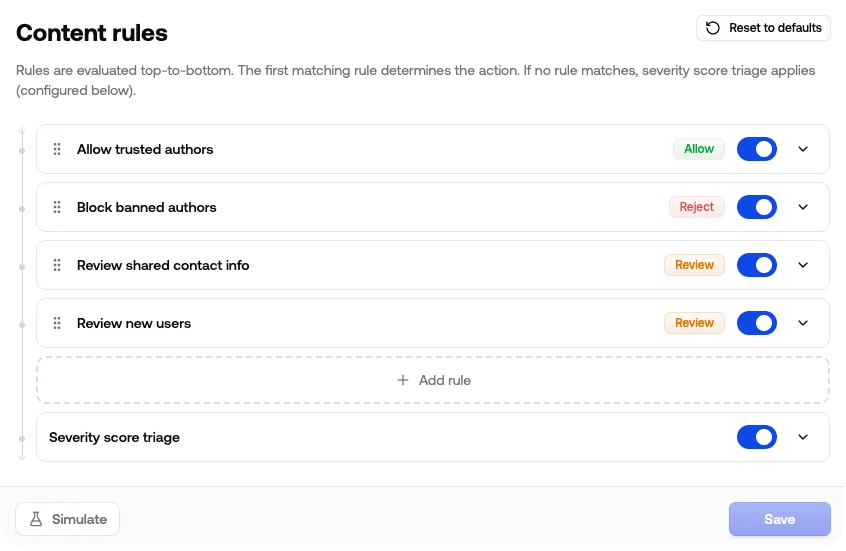
Each content rule reads as *if these conditions are true, then take this action*. Rules run top-to-bottom for every request, and the first match determines the `recommendation.action` returned by the API.
They give you one place to express the moderation logic for a channel.
## Where to find it
Open your project, pick a channel, and go to **Rules**. You'll see your rules listed in evaluation order, with the **Severity score triage** fallback at the bottom.
 ## Common use cases
### Auto-approve trusted users
Skip moderation for users who've built up a track record on your platform.
* **If** Trust Level is at least `Member`
* **Then** Allow
### Block banned users immediately
Reject anything from authors you've already disabled, before any policy even runs.
* **If** Status is not `Enabled`
* **Then** Reject
### Always reject the worst categories
If a category is zero-tolerance for your platform, send it straight to reject regardless of the severity score.
* **If** Illicit is `Flagged`
* **Then** Reject
### Catch risky links from new accounts
Spam and phishing often arrive as a fresh account dropping a link. Combining trust level with URL Risk lets you hold suspect new accounts without slowing down established users.
* **If** Trust Level is at most `New`
* **And** URL Risk is `Flagged`
* **Then** Review
### Tighten moderation for new accounts
Trigger review when a new account hits any flag, even if the severity score wouldn't normally cross your threshold.
* **If** Trust Level is at most `New`
* **And** Any Policy Flagged is `true`
* **Then** Review
### Route by language
Send anything you can't review in-house to a separate action.
* **If** Language is not `English`
* **Then** Review
***
## How rules work
### Conditions
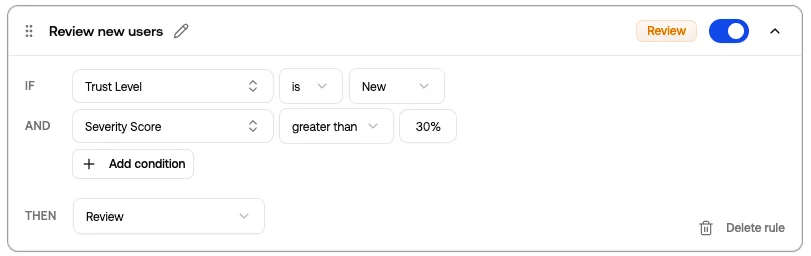
Each rule has one or more conditions. Conditions inside a rule are joined with **AND**: every condition must be true for the rule to match.
A condition has three parts:
* **Field**: the signal you're matching on (Trust Level, Toxicity Score, Sentiment, ...)
* **Operator**: how to compare it (`is`, `is not`, `at least`, `is one of`, ...)
* **Value**: what you're comparing it to
Add more conditions with **+ Add condition** to make the rule narrower.
## Common use cases
### Auto-approve trusted users
Skip moderation for users who've built up a track record on your platform.
* **If** Trust Level is at least `Member`
* **Then** Allow
### Block banned users immediately
Reject anything from authors you've already disabled, before any policy even runs.
* **If** Status is not `Enabled`
* **Then** Reject
### Always reject the worst categories
If a category is zero-tolerance for your platform, send it straight to reject regardless of the severity score.
* **If** Illicit is `Flagged`
* **Then** Reject
### Catch risky links from new accounts
Spam and phishing often arrive as a fresh account dropping a link. Combining trust level with URL Risk lets you hold suspect new accounts without slowing down established users.
* **If** Trust Level is at most `New`
* **And** URL Risk is `Flagged`
* **Then** Review
### Tighten moderation for new accounts
Trigger review when a new account hits any flag, even if the severity score wouldn't normally cross your threshold.
* **If** Trust Level is at most `New`
* **And** Any Policy Flagged is `true`
* **Then** Review
### Route by language
Send anything you can't review in-house to a separate action.
* **If** Language is not `English`
* **Then** Review
***
## How rules work
### Conditions
Each rule has one or more conditions. Conditions inside a rule are joined with **AND**: every condition must be true for the rule to match.
A condition has three parts:
* **Field**: the signal you're matching on (Trust Level, Toxicity Score, Sentiment, ...)
* **Operator**: how to compare it (`is`, `is not`, `at least`, `is one of`, ...)
* **Value**: what you're comparing it to
Add more conditions with **+ Add condition** to make the rule narrower.
 ### Available signals
| Group | Field | Examples |
| -------- | ------------------ | ------------------------------------------------ |
| Author | Trust Level | Untrusted, New, Basic, Member, Regular, Trusted |
| Author | Status | Enabled, Blocked, Temporarily Blocked |
| Severity | Severity Score | A number between `0` and `1` |
| Insights | Sentiment | Positive, Neutral, Negative |
| Insights | Language | English, Spanish, French, ... |
| Policies | Any Policy Flagged | `true` / `false` |
| Policies | `` Flagged | `true` / `false`, per enabled policy |
| Policies | `` Score | A number between `0` and `1`, per enabled policy |
Policy fields appear automatically based on which policies are enabled in the channel. If you disable a policy that a rule still references, the rule is highlighted so you can update or remove it.
### Order matters
Rules run top-to-bottom and the **first** rule that matches wins. Drag rules by the handle on the left to reorder.
A typical ordering:
1. **Allow** rules for trusted users, so they short-circuit everything below
2. **Reject** rules for blocked users or zero-tolerance categories
3. **Review** rules for borderline cases
4. Severity score triage fallback at the bottom
### Actions
Each rule resolves to one of three actions, returned as `recommendation.action`:
| Action | Use when |
| -------- | --------------------------------------------------------- |
| `allow` | Content is fine, publish it |
| `review` | Hold or send to a [review queue](/review-queues/overview) |
| `reject` | Block it |
### Severity score fallback
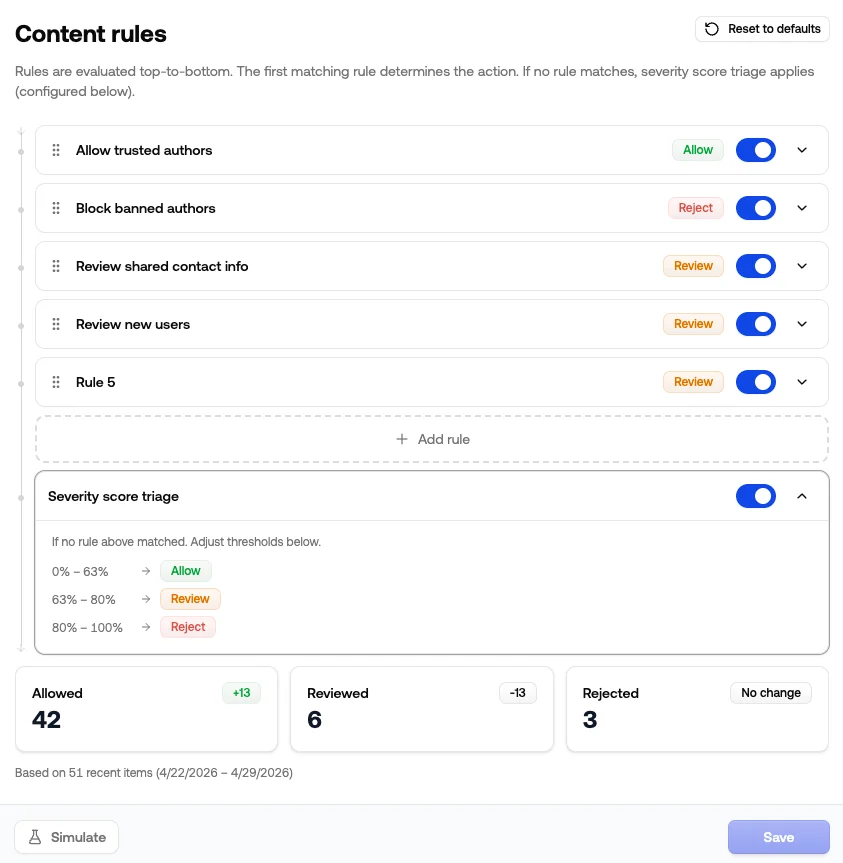
If no rule matches, the channel falls back to **Severity score triage**. This is a built-in step at the bottom of the list that assigns Allow, Review, or Reject based on the severity score thresholds set just below the rules. Click the row to see the current zones.
You can disable triage if you'd rather have non-matching content default to Allow without any severity check. See [Thresholds](/content-moderation/thresholds#severity-score-triage) for how to tune the cutoffs and use the calibration helper.
***
## Simulate before saving
Click **Simulate** to run your draft rules against recent moderation history for this channel. The result shows how the action mix shifts:
* How many recent items would now be Allowed, Reviewed, or Rejected
* The delta versus what actually happened
* The sample size and time range used
Use this to catch over-aggressive rules before they hit production. Simulation reads your unsaved changes, so you can iterate on the rule set safely.
### Available signals
| Group | Field | Examples |
| -------- | ------------------ | ------------------------------------------------ |
| Author | Trust Level | Untrusted, New, Basic, Member, Regular, Trusted |
| Author | Status | Enabled, Blocked, Temporarily Blocked |
| Severity | Severity Score | A number between `0` and `1` |
| Insights | Sentiment | Positive, Neutral, Negative |
| Insights | Language | English, Spanish, French, ... |
| Policies | Any Policy Flagged | `true` / `false` |
| Policies | `` Flagged | `true` / `false`, per enabled policy |
| Policies | `` Score | A number between `0` and `1`, per enabled policy |
Policy fields appear automatically based on which policies are enabled in the channel. If you disable a policy that a rule still references, the rule is highlighted so you can update or remove it.
### Order matters
Rules run top-to-bottom and the **first** rule that matches wins. Drag rules by the handle on the left to reorder.
A typical ordering:
1. **Allow** rules for trusted users, so they short-circuit everything below
2. **Reject** rules for blocked users or zero-tolerance categories
3. **Review** rules for borderline cases
4. Severity score triage fallback at the bottom
### Actions
Each rule resolves to one of three actions, returned as `recommendation.action`:
| Action | Use when |
| -------- | --------------------------------------------------------- |
| `allow` | Content is fine, publish it |
| `review` | Hold or send to a [review queue](/review-queues/overview) |
| `reject` | Block it |
### Severity score fallback
If no rule matches, the channel falls back to **Severity score triage**. This is a built-in step at the bottom of the list that assigns Allow, Review, or Reject based on the severity score thresholds set just below the rules. Click the row to see the current zones.
You can disable triage if you'd rather have non-matching content default to Allow without any severity check. See [Thresholds](/content-moderation/thresholds#severity-score-triage) for how to tune the cutoffs and use the calibration helper.
***
## Simulate before saving
Click **Simulate** to run your draft rules against recent moderation history for this channel. The result shows how the action mix shifts:
* How many recent items would now be Allowed, Reviewed, or Rejected
* The delta versus what actually happened
* The sample size and time range used
Use this to catch over-aggressive rules before they hit production. Simulation reads your unsaved changes, so you can iterate on the rule set safely.
 ***
## What you see in the API response
When a rule matches, the moderation response reflects it:
```json theme={"theme":"nord"}
{
"recommendation": {
"action": "review",
"reason_codes": ["rule_match"]
}
}
```
Reason codes you may see when rules are configured:
| Reason code | Meaning |
| ----------------- | --------------------------------------------------------------------------------------------------------------------- |
| `rule_match` | A configured rule matched, and the action came from that rule |
| `rule_fallback` | The severity score triage fallback matched |
| `rule_default` | No rule matched and triage is disabled, so the channel default was used |
| `client_override` | A [`clientAction`](/content-moderation/submit-content#clientaction) on the request changed the action after rules ran |
Read more about acting on the response in [Understanding API responses](/content-moderation/acting-on-responses).
If you submit a [`clientAction`](/content-moderation/submit-content#clientaction) with a request — your own recommendation from a blocklist or external tool — it's applied **after** your rules and the severity fallback. Depending on its `behavior`, it can escalate or override the action they produced.
***
## Tips
* **Start broad and tighten over time.** One or two big-picture rules (allow trusted, reject blocked) plus the severity fallback gets most channels 80% of the way there. Add narrower rules as you spot patterns in the queue.
* **Don't be afraid to lean on severity score triage.** It does a good job out of the box: blocking the obvious stuff, sending borderline items to review, and letting clean content through. Rules are best for the cases triage can't express on its own (author trust, specific categories, language routing).
* **Give rules a real name.** They show up in dashboards and audit logs, so "Reject high toxicity" is more useful than "Rule 4". The pencil icon on an expanded rule lets you rename it.
* **Run Simulate after every change.** A condition that looks safe on paper can quietly shift hundreds of items between Review and Reject, and Simulate is the fastest way to spot it.
* **Toggle off instead of deleting.** When you're not sure if a rule is still pulling its weight, disable it. You keep the configuration around and can flip it back on if the data says otherwise.
***
## What you see in the API response
When a rule matches, the moderation response reflects it:
```json theme={"theme":"nord"}
{
"recommendation": {
"action": "review",
"reason_codes": ["rule_match"]
}
}
```
Reason codes you may see when rules are configured:
| Reason code | Meaning |
| ----------------- | --------------------------------------------------------------------------------------------------------------------- |
| `rule_match` | A configured rule matched, and the action came from that rule |
| `rule_fallback` | The severity score triage fallback matched |
| `rule_default` | No rule matched and triage is disabled, so the channel default was used |
| `client_override` | A [`clientAction`](/content-moderation/submit-content#clientaction) on the request changed the action after rules ran |
Read more about acting on the response in [Understanding API responses](/content-moderation/acting-on-responses).
If you submit a [`clientAction`](/content-moderation/submit-content#clientaction) with a request — your own recommendation from a blocklist or external tool — it's applied **after** your rules and the severity fallback. Depending on its `behavior`, it can escalate or override the action they produced.
***
## Tips
* **Start broad and tighten over time.** One or two big-picture rules (allow trusted, reject blocked) plus the severity fallback gets most channels 80% of the way there. Add narrower rules as you spot patterns in the queue.
* **Don't be afraid to lean on severity score triage.** It does a good job out of the box: blocking the obvious stuff, sending borderline items to review, and letting clean content through. Rules are best for the cases triage can't express on its own (author trust, specific categories, language routing).
* **Give rules a real name.** They show up in dashboards and audit logs, so "Reject high toxicity" is more useful than "Rule 4". The pencil icon on an expanded rule lets you rename it.
* **Run Simulate after every change.** A condition that looks safe on paper can quietly shift hundreds of items between Review and Reject, and Simulate is the fastest way to spot it.
* **Toggle off instead of deleting.** When you're not sure if a rule is still pulling its weight, disable it. You keep the configuration around and can flip it back on if the data says otherwise.