> ## Documentation Index
> Fetch the complete documentation index at: https://docs.moderationapi.com/llms.txt
> Use this file to discover all available pages before exploring further.
# Casebook topics
> Your precedent, organized into named themes you can browse, pin, and write rules against
Topics are the table of contents of your casebook. As cases accumulate, they're
grouped into plainly named themes — "Telegram spam", "Insults between players",
"Heated product feedback" — so you can see what kinds of content your team is ruling
on, and how.
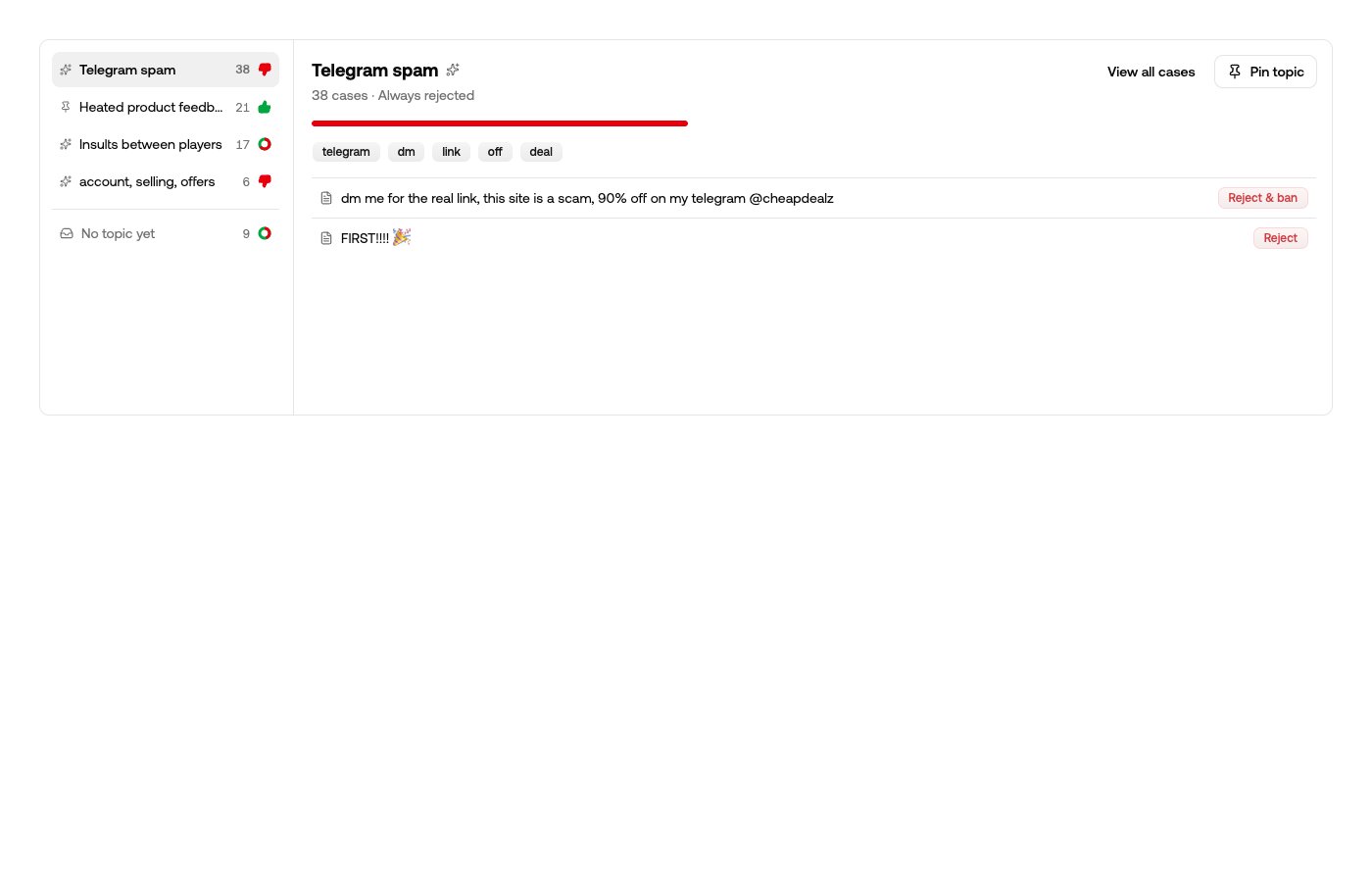 Each topic shows its case count, its ruling tendency — *Always rejected*, *Always
allowed*, or a split like *42% rejected* — its keywords, and recent cases. **View all
cases** filters the ledger below to the topic.
A split tendency isn't a defect — it's often the insight. A team that rejects
cannabis sales while allowing other sales will see exactly that split, and can dive
into the topic to check the boundary is where they want it.
The last row is always **No topic yet**: cases still being committed to memory,
waiting for the next organizing pass, or one-offs too unlike anything else to file.
## Young casebooks reorganize, grown ones settle
Topics appear on their own after about ten cases, and the page tells you which of two
phases you're in:
* **While the casebook is small**, every organizing pass re-reads the whole of it and
re-authors the topics. Yesterday's names aren't binding — a topic that was really
just the first week's traffic gets renamed or dropped as the picture fills in.
* **As it grows**, topics stop moving and passes only add new ones, so the vocabulary
your team has been reading for weeks stays put.
Organizing runs in the background — the footer shows when the last pass ran, and
**Reorganize now** asks for a fresh one.
## Pinning
Pinning a topic is how you say "keep this". A pinned topic keeps its name and
survives every organizing pass; new cases can still be filed into it. You can also
**Rename topic** — renaming or pinning tells automation to leave the topic alone.
Writing a rule about a topic pins it automatically, so nothing your rules depend on
can be reshaped underneath you.
## Rules that act on a topic
Any [content rule](/content-moderation/rules) can be scoped to a casebook topic —
*if the content matches this topic, then take this action*. That lets you act on a
whole kind of content before enough precedent has accumulated for the casebook to
settle it case by case: send a borderline topic to review, or reject a scam topic
outright.
## The weekly digest
When your casebook identifies a new topic, you get a weekly summary email. Nothing is
sent in a week with no new topics, and you can turn it off in your notification
settings under **New casebook topics**.
Each topic shows its case count, its ruling tendency — *Always rejected*, *Always
allowed*, or a split like *42% rejected* — its keywords, and recent cases. **View all
cases** filters the ledger below to the topic.
A split tendency isn't a defect — it's often the insight. A team that rejects
cannabis sales while allowing other sales will see exactly that split, and can dive
into the topic to check the boundary is where they want it.
The last row is always **No topic yet**: cases still being committed to memory,
waiting for the next organizing pass, or one-offs too unlike anything else to file.
## Young casebooks reorganize, grown ones settle
Topics appear on their own after about ten cases, and the page tells you which of two
phases you're in:
* **While the casebook is small**, every organizing pass re-reads the whole of it and
re-authors the topics. Yesterday's names aren't binding — a topic that was really
just the first week's traffic gets renamed or dropped as the picture fills in.
* **As it grows**, topics stop moving and passes only add new ones, so the vocabulary
your team has been reading for weeks stays put.
Organizing runs in the background — the footer shows when the last pass ran, and
**Reorganize now** asks for a fresh one.
## Pinning
Pinning a topic is how you say "keep this". A pinned topic keeps its name and
survives every organizing pass; new cases can still be filed into it. You can also
**Rename topic** — renaming or pinning tells automation to leave the topic alone.
Writing a rule about a topic pins it automatically, so nothing your rules depend on
can be reshaped underneath you.
## Rules that act on a topic
Any [content rule](/content-moderation/rules) can be scoped to a casebook topic —
*if the content matches this topic, then take this action*. That lets you act on a
whole kind of content before enough precedent has accumulated for the casebook to
settle it case by case: send a borderline topic to review, or reject a scam topic
outright.
## The weekly digest
When your casebook identifies a new topic, you get a weekly summary email. Nothing is
sent in a week with no new topics, and you can turn it off in your notification
settings under **New casebook topics**.